
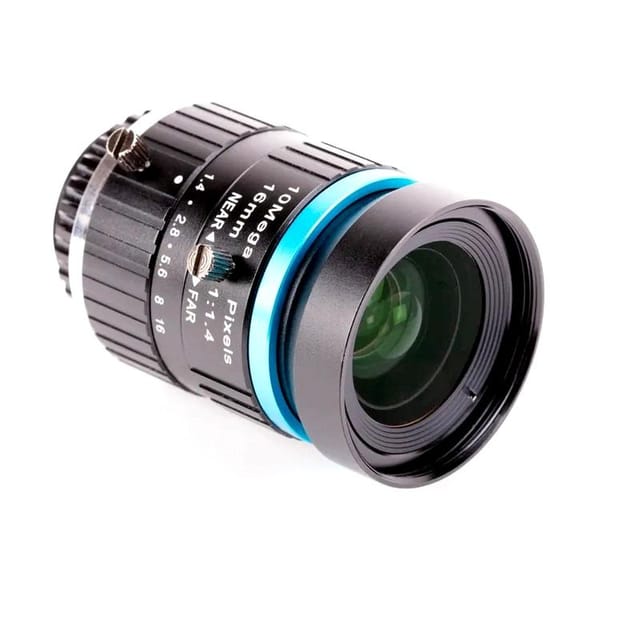
The 16 mm lens provides a higher quality image than the 6 mm lens. It has a narrow-angle view which is more suited to viewing distant objects. Ensure the C-CS adapter that comes with the High-Quality Camera is fitted to the lens. The lens is a C-mount device, so it has a longer back focus than the 6 mm lens and therefore requires the adapter. Rotate the lens and C-CS adapter clockwise all the way into the back focus adjustment ring.
The back focus adjustment ring should be screwed in fully. Use the back focus lock screw to make sure it does not move out of this position when adjusting the aperture or focus. To adjust the aperture, hold the camera with the lens facing away from you. Turn the inner ring, closest to the camera, while holding the camera steady. Turn clockwise to close the aperture and reduce image brightness. Turn anti-clockwise to open the aperture. Once you are happy with the light level, tighten the screw on the side of the lens to lock the aperture into position.
To adjust focus, hold the camera with the lens facing away from you. Turn the focus ring, labeled “NEAR FAR”, anti-clockwise to focus on a nearby object. Turn it clockwise to focus on a distant object. You may find you need to adjust the aperture again after this.
1 x 16mm Telephoto Lens for Raspberry Pi High-Quality Camera
The 16 mm lens provides a higher quality image than the 6 mm lens. It has a narrow-angle view which is more suited to viewing distant objects. Ensure the C-CS adapter that comes with the High-Quality Camera is fitted to the lens. The lens is a C-mount device, so it has a longer back focus than the 6 mm lens and therefore requires the adapter. Rotate the lens and C-CS adapter clockwise all the way into the back focus adjustment ring.
The back focus adjustment ring should be screwed in fully. Use the back focus lock screw to make sure it does not move out of this position when adjusting the aperture or focus. To adjust the aperture, hold the camera with the lens facing away from you. Turn the inner ring, closest to the camera, while holding the camera steady. Turn clockwise to close the aperture and reduce image brightness. Turn anti-clockwise to open the aperture. Once you are happy with the light level, tighten the screw on the side of the lens to lock the aperture into position.
To adjust focus, hold the camera with the lens facing away from you. Turn the focus ring, labeled “NEAR FAR”, anti-clockwise to focus on a nearby object. Turn it clockwise to focus on a distant object. You may find you need to adjust the aperture again after this.
1 x 16mm Telephoto Lens for Raspberry Pi High-Quality Camera
Subscribe to get Email Updates!
Thanks for subscribe.
Your response has been recorded.
Tenet Technetronics focuses on “Simplifying Technology for Life” and has been striving to deliver the same from the day of its inception since 2007. Founded by young set of graduates with guidance from ardent professionals and academicians the company focuses on delivering high quality products to its customers at the right cost considering the support and lifelong engagement with customers. “We don’t believe in a sell and forget model “and concentrate and building relationships with customers that accelerates, enhances as well as provides excellence in their next exciting project.